
Chatzy has become one of the most recognisable platforms for creating private chat rooms without complicated setup, downloads, or account verification. From classroom groups to hobby communities to private team discussions, this lightweight tool offers an easy way to create invite-only spaces with just a link and a password. The fact that Chatzy works instantly inside any browser is a big part of its appeal — no apps, no installations, no mess.
Popular Alternatives:



Whether someone wants a clean breakout room for a project or a fully private space for personal conversations, Chatzy delivers the kind of simplicity that many modern platforms overcomplicate. This review breaks down everything users need to know: features, pricing, safety, alternatives, and common FAQs.
Chatzy Overview
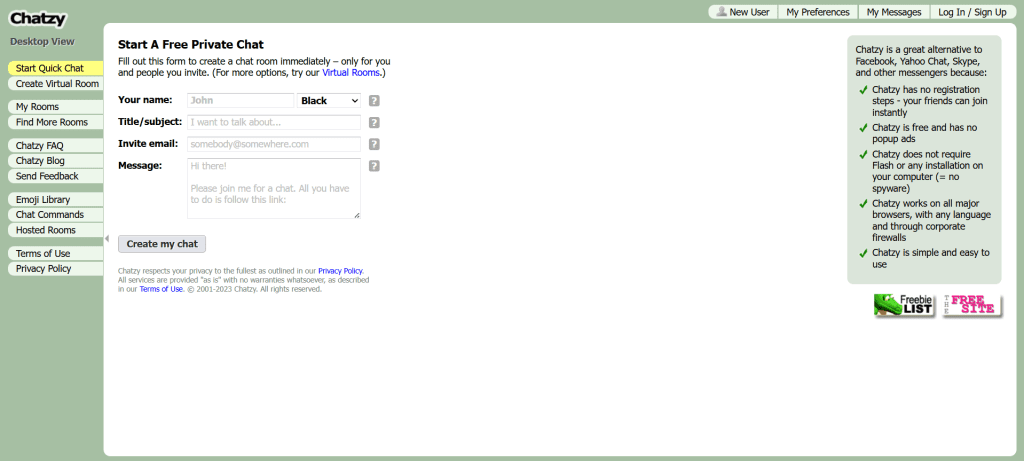
Chatzy is built around one core principle: create a private chat room instantly and let people join with a simple link. It removes the usual friction found on messaging apps — no phone number required, no profile setup, no downloads. This makes it perfect for temporary groups, quick meetings, classroom sessions, or small communities that want privacy without commitment.
Why Chatzy Stands Out
Chat rooms are fully customizable
Users can create open or password-protected rooms
Everything loads inside the browser — no app required
Supports group text chat, announcements, and moderation tools
Works on desktop, tablet, and mobile browsers
Rooms can stay active for long-term use or single sessions
Chatzy’s biggest advantage is its flexibility. It’s simple enough for beginners yet powerful enough for organisers who need structured participation, rules, or moderation.
How Chatzy Works
To start, users create a room, set a title, write a description, and optionally add a password. The platform then generates a unique link that can be shared publicly or privately. Anyone with the link can enter the room immediately, unless the creator adds restrictions.
Using Chatzy Step-by-Step
Visit the website
Create a new room with a name and description
Set optional privacy rules or a password
Share the link with participants
Begin chatting instantly in a browser window
Manage members, remove users, or adjust room settings anytime
The platform supports lightweight group communication without forcing anyone to install software or create accounts, which is exactly why Chatzy remains popular for temporary or anonymous chat environments.
Features of Chatzy
Chatzy includes multiple tools that allow users to shape their rooms based on purpose, audience, and communication style.
Private Room Creation
Every room is created independently, meaning each space exists as its own environment. This is ideal for:
Study groups
Project teams
Hobby communities
Online classes
Anonymous discussion spaces
Event coordination
Users can join instantly, without approval, unless restrictions are activated.
Room Customization Options
Chatzy allows room creators to adjust:
Theme colours
Background
Text and link colours
Display name rules
Entry messages
Banned words
Moderation privileges
These options help organisers shape the chat room’s tone and environment.
Message and User Controls
Moderators can:
Mute users
Kick users
Ban members
Adjust posting rules
Limit who can speak
This gives the room owner complete control over safety and flow of conversation.
Mobile-Friendly Experience
Chatzy runs smoothly across browsers, meaning it works on:
Android phones
iPhones
iPads
Windows PCs
Mac devices
There is no compromise — users get the same experience on any device.
Pricing Explained
Chatzy is mainly free, but optional paid features exist for room owners who want extra tools.
The free version includes:
✓ Unlimited rooms
✓ Basic customization
✓ Password-protected rooms
✓ Global chat access
✓ Invite-based sharing
Premium upgrades offer:
✓ Advanced themes
✓ More control options
✓ Priority room visibility
✓ Extra admin tools
Organisers who run long-term or high-traffic rooms often upgrade, but casual users rarely need to.
User Base and Experience
Chatzy attracts a wide range of communities because the platform is open-ended. It doesn’t focus on dating, random chat, or adult content specifically — it serves any group needing a private text-based room.
Typical user groups include:
Students collaborating on projects
Gamers forming strategy rooms
Companies needing temporary discussion spaces
Writers and hobby groups
Anonymous support or interest communities
People who want secure communication without sharing personal details
Chatzy’s frictionless onboarding and privacy settings make it versatile enough for almost any use case.
Advantages
Simple room creation with no complexity
No registration required for guests
Highly customizable experience
Works in all browsers
Password protection adds privacy
Flexible for both short-term and long-term rooms
Disadvantages
Limited multimedia support
Not ideal for large-scale or professional corporate environments
No built-in video or voice chat
Moderation relies on the room creator
Public rooms can attract trolls or spam if unmoderated
Safety Considerations
Chatzy is as safe as the creator makes it. The platform provides tools, but users must configure them properly. Always remember:
Never share personal information
Use passwords to restrict access
Kick or ban disruptive users immediately
Monitor rooms if they involve younger audiences
Use moderation tools actively
Avoid joining unknown public rooms
Chatzy does not display ads that track users, but standard online caution still applies when interacting with strangers.
Alternatives to Chatzy
Before choosing any chat platform, users often compare features such as privacy, ease of use, and room capacity. The following platforms frequently appear as direct competitors:
| Platform | Description |
|---|---|
| FTF.Live | A smooth, modern chat platform with clean rooms and quick setup. |
| CooMeet | A polished platform known for its verification tools and secure environment. |
| Free Chat | A simple space for general chatting with minimal barriers to entry. |
| Omegle | One of the most famous random chat platforms with global traffic. |
| Chatrandom | Offers random chat, filters, and structured categories. |
| Tinychat | Room-based group chat with voice and video support. |
| Chatspin | A filter-based random chat site focusing on global matching. |
Frequently Asked Questions
Is Chatzy free?
Yes. Creating and joining rooms is free, with optional upgrades for advanced customization.
Can I make my room private?
Yes, you can set a password so only invited users can join.
Does Chatzy require an account?
Guests can join without registering. Room creators may create an account for easier management.
Can I run multiple rooms?
Yes, users can create as many rooms as they want.
Are rooms monitored?
Only by the creator or moderators — Chatzy does not heavily monitor public rooms.
Does Chatzy allow voice or video chat?
No, it is strictly text-based.
Can I delete a room?
Yes, room creators can delete their rooms at any time.
Is Chatzy safe for teens?
Only if properly moderated. Public rooms are not recommended.
Can I block users?
Room moderators can kick or ban disruptive participants.
Do rooms expire?
Rooms stay active as long as they are used or managed.
Can I use Chatzy on mobile?
Yes, the platform works well on all mobile browsers.
Are conversations encrypted?
Chatzy uses standard web protections but is not designed for high-security communication.
Final Verdict
Chatzy remains one of the most flexible private chat room tools available online. Its instant setup, password-protected rooms, and simple interface make it perfect for classrooms, events, hobby communities, temporary groups, or anyone who wants quick group communication without installing software. The platform is easy to use, customizable, and reliable as long as users follow good safety practices.
Anyone looking for a private text-based environment will find Chatzy a solid option, offering simplicity, control, and convenience.